HK Site Analysis
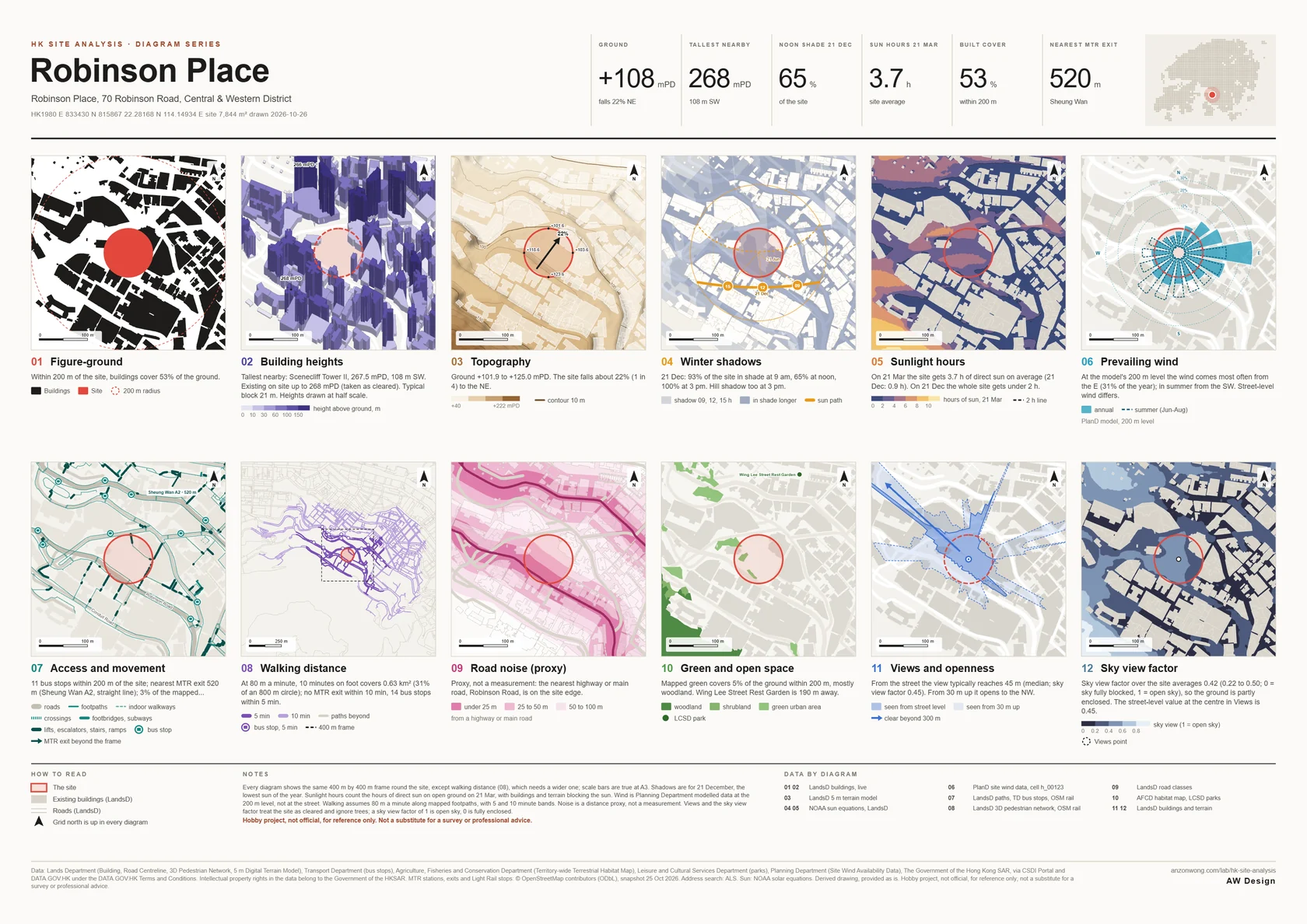
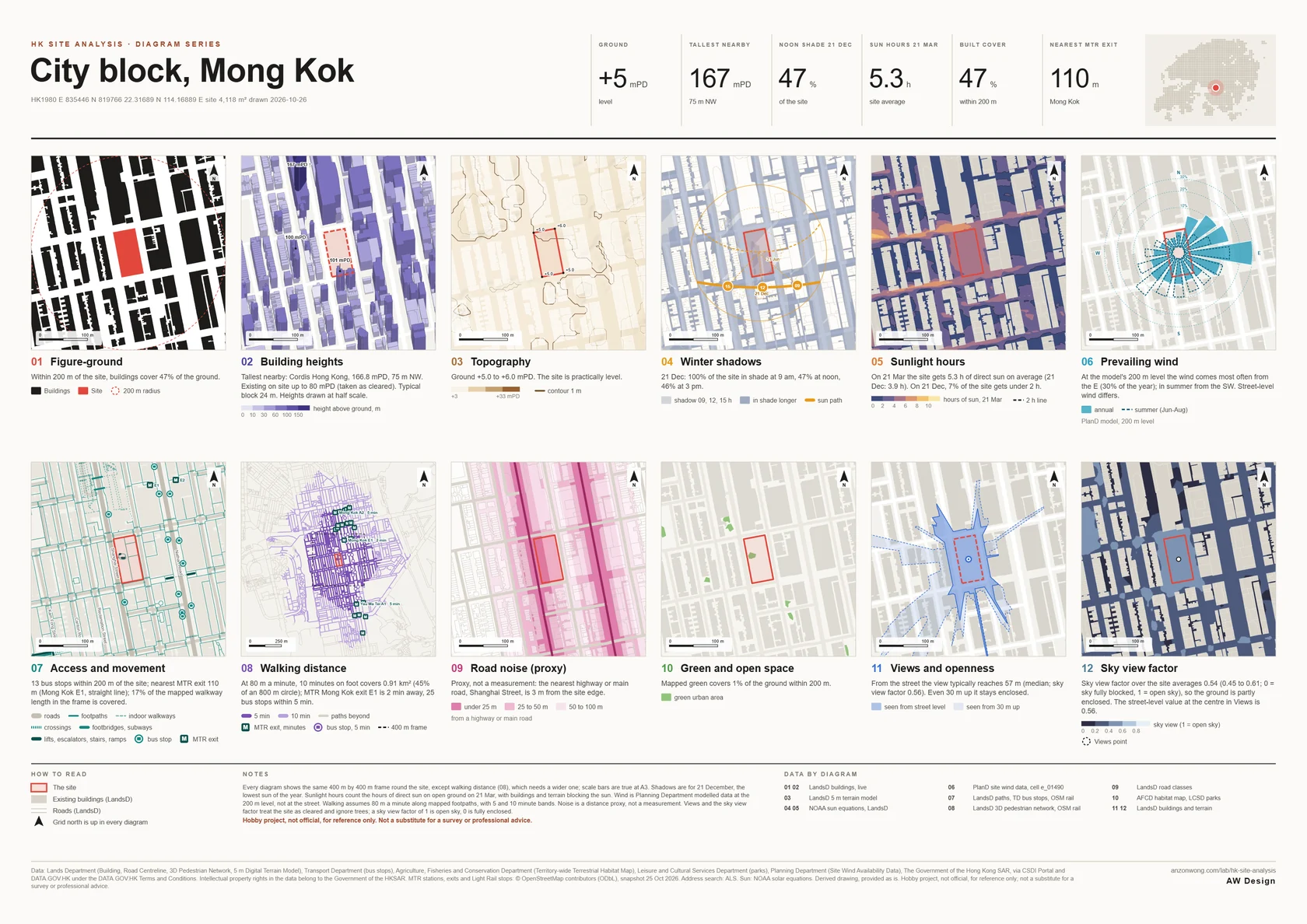
Pick a site anywhere in Hong Kong and get twelve site analysis diagrams, drawn to the same frame and scale (walking distance uses a wider one): figure-ground, building heights, topography, winter shadows, sunlight hours, prevailing wind, access, walking distance, road noise, green space, views and sky view factor. Turn the site in 3D, pull the diagrams apart into an exploded axonometric, pick a colour style, and download an A3 or A2 board, square images, or DXF and SVG drawings in HK1980 Grid for your CAD.
Site
Your board of twelve diagrams appears here after Analyse site.
Data: Lands Department, Planning Department, Transport Department, Agriculture, Fisheries and Conservation Department and Leisure and Cultural Services Department, The Government of the Hong Kong SAR, via CSDI Portal and DATA.GOV.HK; MTR exits and Light Rail stops © OpenStreetMap contributors. Hobby project, not official, for reference only. Not a substitute for a survey or professional advice.
- Search an address or a building name, or click the map. You can also type coordinates (lat, lon or HK1980 E, N).
- Set the site: a circle of 25 to 200 m radius, or Draw boundary and click the corners of your site. Drag the dot to move it.
- Give the board a title if you like. Leave the frame on Auto or pick a size; the dashed square on the map is what the diagrams cover. Pick a colour style (Paper, Line, Vivid or Night) and a square or round frame; you can change both after the analysis.
- Press Analyse site. The data loads live from Government servers, usually in about ten seconds. Then download the A3 or A2 PDF, the PNG board, or the twelve squares as a ZIP.
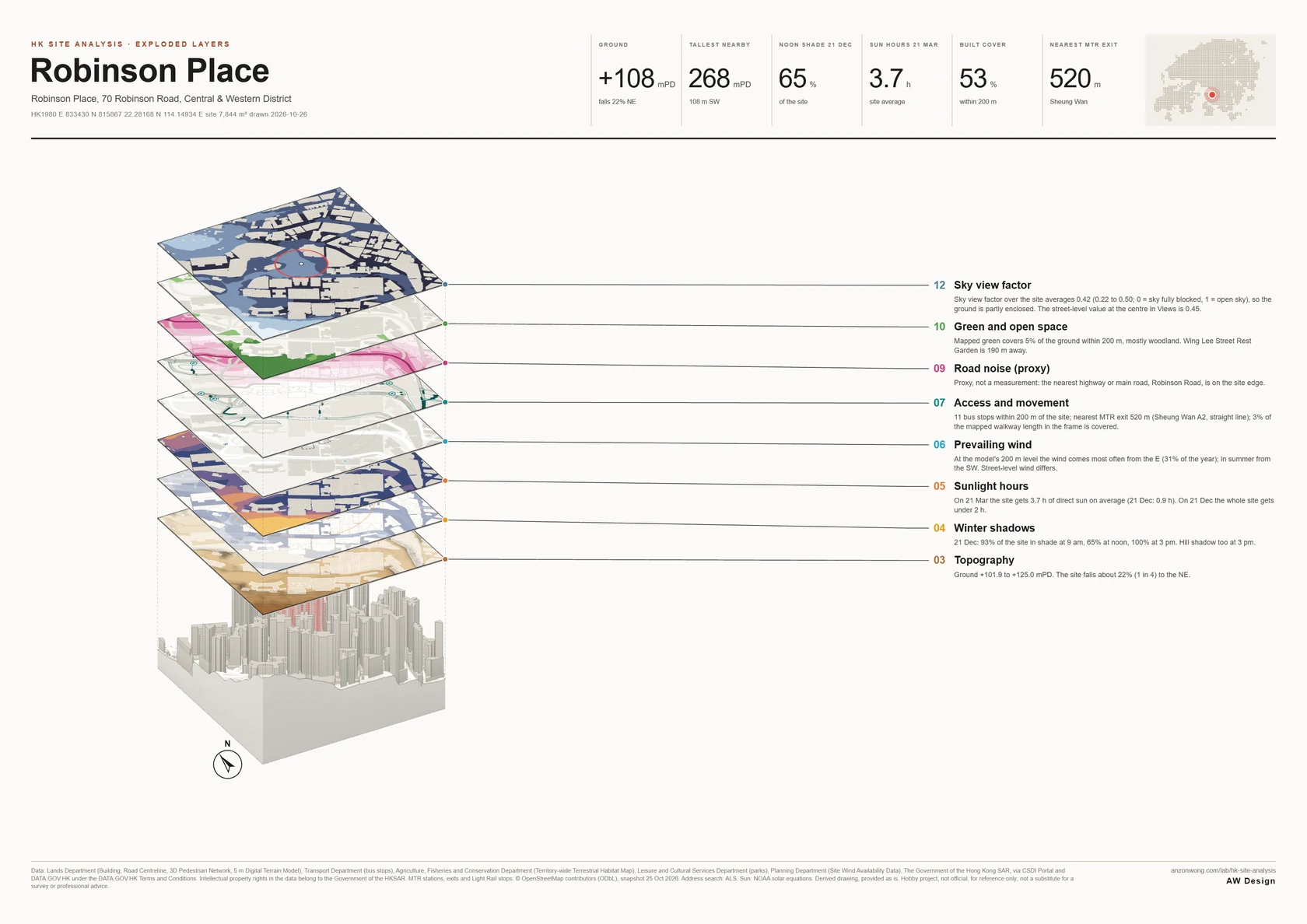
- Open 3D model to turn the site round, or Exploded layers to see the diagrams stacked over it; drag to orbit, pinch or scroll to zoom. Exploded view (PNG) saves an A3 sheet of it. DXF and SVG give the 2D layers in HK1980 Grid metres, on named layers.
- 01 Figure-groundBuildings in black on white, and how much of the ground within the frame's radius they cover.
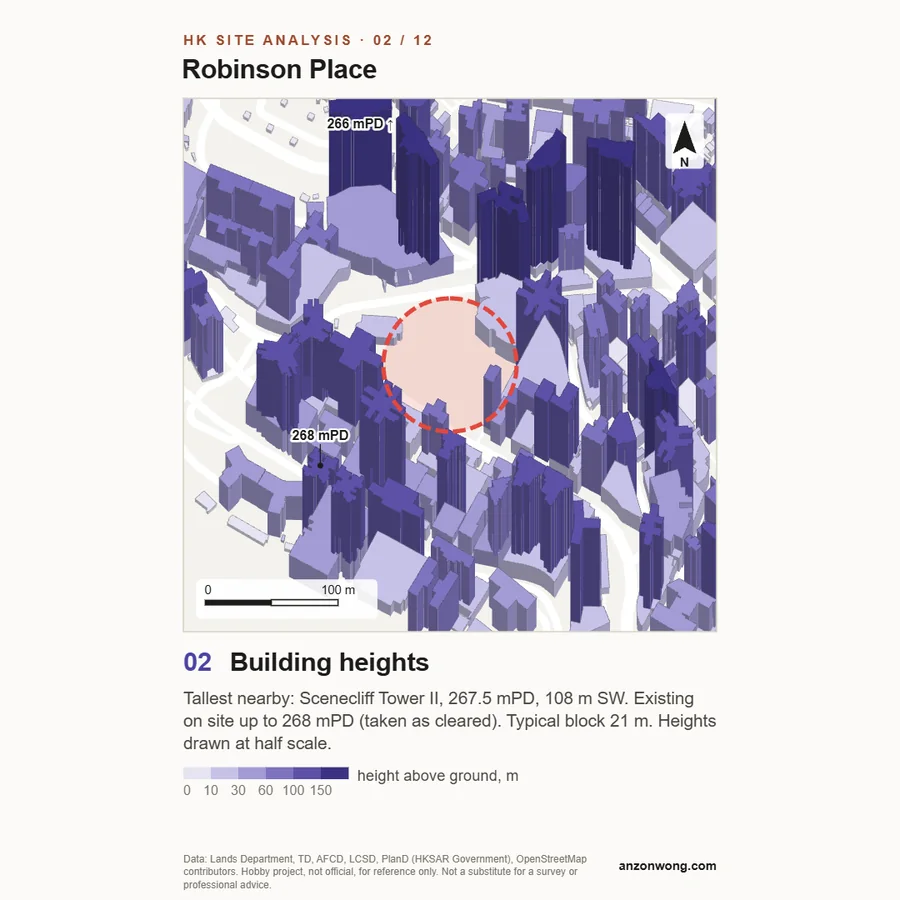
- 02 Building heightsEvery block raised as a plan-oblique and shaded in six classes of height above the ground, with the three tallest labelled in mPD. Heights are drawn at half scale so tall towers do not hide the street.
- 03 TopographyGround levels in colour bands with hill shading, contours in mPD, spot levels on the site, and an arrow showing how steeply and which way the site falls.
- 04 Winter shadowsShadows on 21 December, the lowest sun of the year, at 9 am, noon and 3 pm, overlaid so the ground that stays in shade longest reads darkest. The sun path for 21 December and 21 June, and the share of the site in shade at each hour.
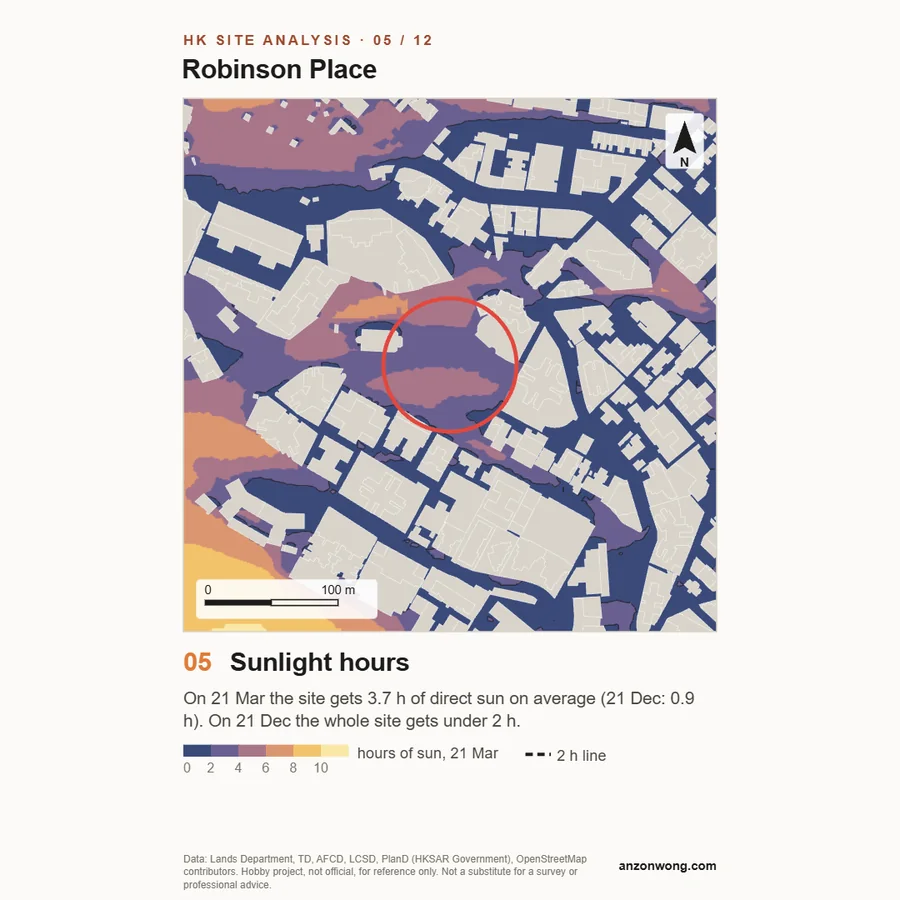
- 05 Sunlight hoursHow many hours of direct sun each patch of ground gets on 21 March (the equinox), as a colour map, with the site's average and the share under two hours, and the same for 21 December. Every building and the hills can cast shade; the site itself is taken as cleared.
- 06 Prevailing windWind roses for the year and for summer (June to August) from the Planning Department's simulated data for the grid cell that holds the site, at the data's 200 m level.
- 07 Access and movementFootpaths, footbridges, escalators and stairs, bus stops, MTR exits and Light Rail stops, with the nearest exit and stop by straight-line distance and the share of mapped walkways that are covered.
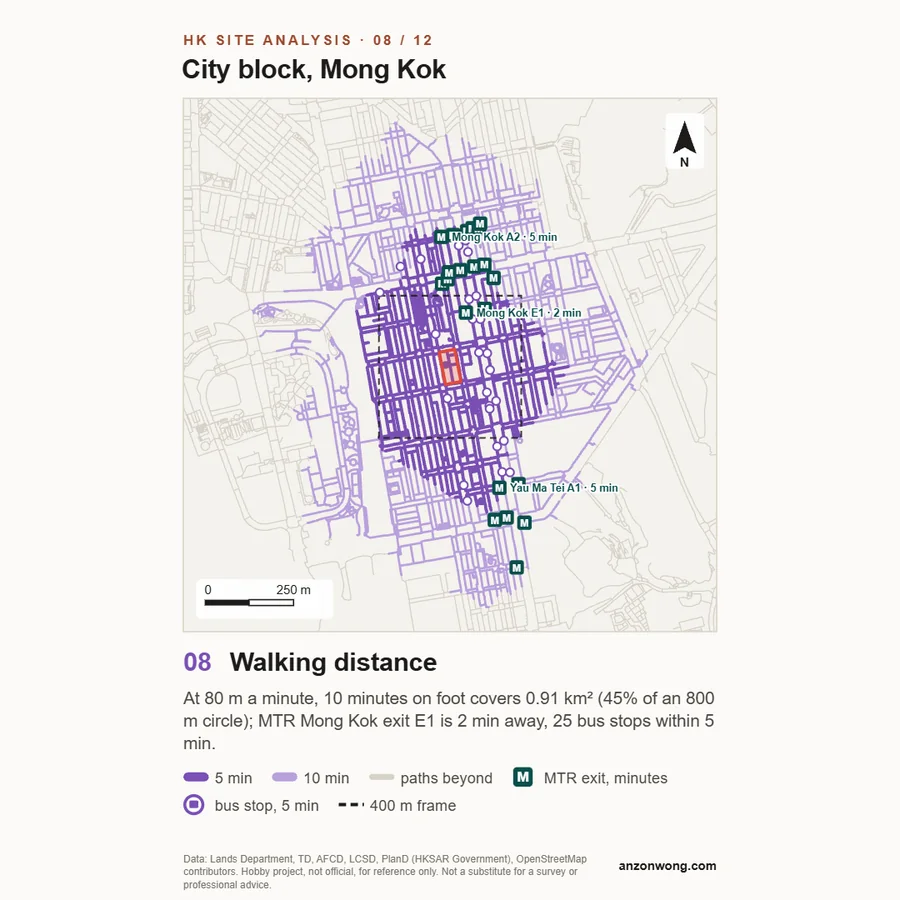
- 08 Walking distanceWhere you can walk from the site in 5 and 10 minutes along the Lands Department's 3D Pedestrian Network, including footbridges, subways, stairs and escalators, at an average 80 m a minute, with the MTR exits and bus stops inside that reach.
- 09 Road noise (proxy)Bands at 25, 50 and 100 m from highways and main roads. A distance proxy for where traffic noise is likely to matter, not a noise measurement.
- 10 Green and open spaceWoodland, shrubland, grassland, farmland and green urban areas from the habitat map, public parks nearby, and how much of the ground round the site is green.
- 11 Views and opennessHow far you can see from the middle of the site at street level and from 30 m up, the directions that stay open, and the sky view factor at street level (1 is open sky, 0 is fully enclosed).
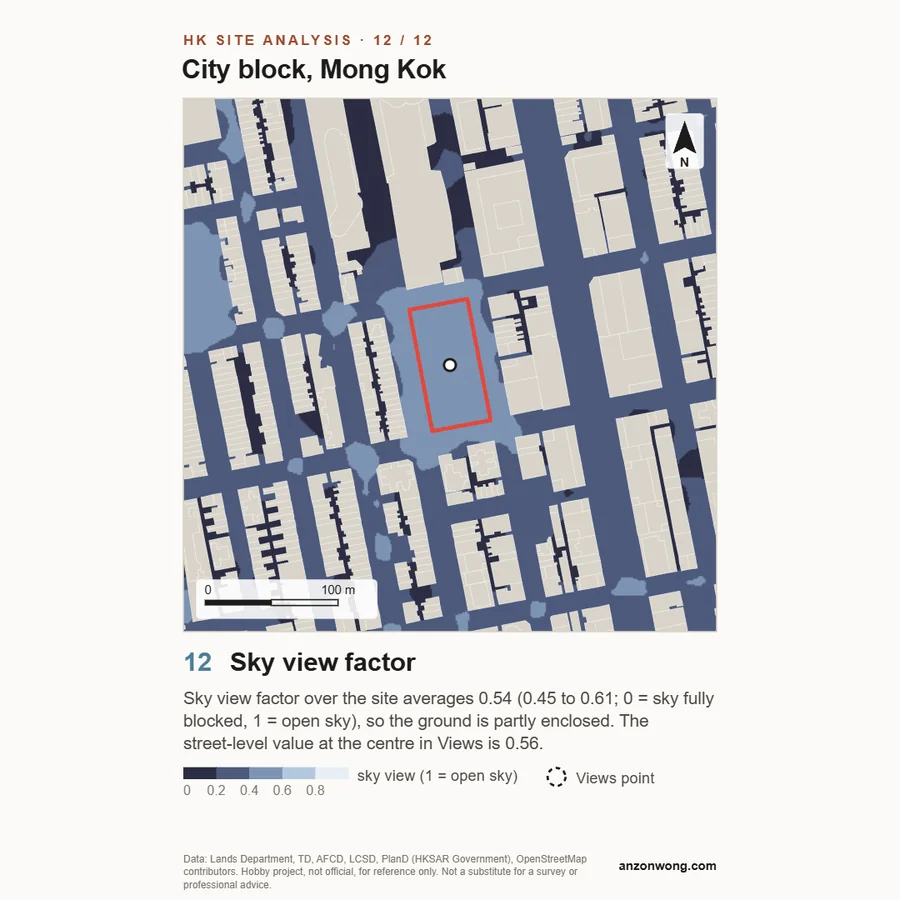
- 12 Sky view factorThe sky view factor at head height over the whole frame, as a colour map: how much of the sky you would see standing at each spot, from 0 (fully enclosed) to 1 (open sky), with the average over the site.
- 3D and exploded viewThe buildings (Lands Department heights) on the terrain model in 3D, and eight of the diagrams (topography, shadows, sunlight hours, wind, access, noise, green and sky view factor) lifted off as floating plates above the site, like an exploded axonometric; you can switch plates on and off. Save it as an A3 sheet with each layer labelled and its finding.
- DXF and SVGThe 2D layers (site, buildings with heights, roads, contours, shadows, walkways, transport, green, views and walking reach) as real HK1980 Grid coordinates in metres, one named layer each, ready to drop into AutoCAD, Rhino or Illustrator.
Every diagram is drawn only from data the tool loaded. If a Government server does not answer, or a layer has nothing near the site, the diagram says so in words instead of guessing.
Building heights are the base and top levels Lands Department records for each block. Where a block has no recorded height it is estimated from its storeys, and when a fifth or more of the blocks in view are estimated the heights caption says how many. Roof features and setbacks are not included. In diagram 02 heights are drawn at half scale.
Sun positions use the NOAA solar equations, Hong Kong time. Drawn shadows fall on a level plane at the site's mean ground level, so shadows on sloping ground further away are approximate. The share of the site in shade is worked out separately, with a 3D sun-ray test from points across the site against every building and the terrain.
Wind is the Planning Department's Site Wind Availability Data: simulated, hourly figures for 2009, at the 200 m level of the data, for a grid cell of several hundred metres. It describes the wind arriving over the area, not the wind at street level, and it is not an air ventilation assessment.
Road noise is a distance proxy only: it knows the road class, not the traffic, barriers, building facades or measured levels. MTR exits and Light Rail stops come from an OpenStreetMap snapshot of 25 October 2026; a few exits are missing there or have no letter. The nearest exit in the facts and in diagram 07 is a straight-line distance; diagram 08 gives walking times along the network.
Views treat the site as cleared, ignore trees, and look from the middle of the site. The terrain is the 5 m Digital Terrain Model, accurate to about plus or minus 5 m; it carries some flyovers, embankments and tree canopy, so a view or a contour can stop or wobble early there. Every diagram has grid north up; in Hong Kong grid north and true north differ by less than a tenth of a degree.
Sunlight hours count the sun in 10-minute steps while it is more than 2 degrees above the horizon, on 21 March and 21 December, at ground level, against every building block and the terrain. It is direct sun only, with no allowance for cloud, trees, balconies or reflected light, and it is not a daylight or sunlight assessment to any standard. The sky view map uses the same buildings and terrain at 1.5 m above the ground, looking in 36 directions.
Walking distance assumes 80 m a minute along the mapped network, measured in 3D; stairs count double and escalators one and a half times, and each lift or signalled crossing adds 30 seconds. Paid MTR concourses are left out. Escalators and travelators that the Lands Department data codes as one-way are walked only that way, with times measured from the site outward; the Central to Mid-Levels escalator, which reverses at 10 am, is counted both ways. It does not know real waiting times, opening hours of malls and footbridges, or paths missing from the data. Where the network has no paths near the site, roads are used instead and the diagram says so.
The 3D view and the DXF and SVG files carry the same data and the same limits as the diagrams. Buildings are simple prisms from base to top level, without roof features.
Hobby project, not official, for reference only. Not a substitute for a survey or professional advice.
- BuildingsBuilding, Lands Department, loaded live from the CSDI Portal; dataset page on DATA.GOV.HK
- RoadsRoad Centreline, Lands Department, loaded live from the CSDI Portal; dataset page on DATA.GOV.HK
- Terrain5m Grid DTM, Lands Department, via DATA.GOV.HK (tiled 18 Oct 2026 for HK Site Model)
- Walkways3D Pedestrian Network, Lands Department, via CSDI Portal (live)
- Bus stopsCoordinate of Bus Stop Location, Transport Department, via CSDI Portal (live)
- WindSite Wind Availability Data, Planning Department, via CSDI Portal and pland.gov.hk (live)
- HabitatsTerritory-wide Terrestrial Habitat Map of Hong Kong, Agriculture, Fisheries and Conservation Department, loaded live from the CSDI Portal (dataset page on DATA.GOV.HK; mapped from satellite images of September to December 2019)
- ParksParks, Zoos and Gardens, Leisure and Cultural Services Department, via CSDI Portal (live)
- MTRMTR stations, exits and Light Rail stops, © OpenStreetMap contributors, ODbL, snapshot 25 Oct 2026 shipped with the tool
- Address searchAddress Lookup Service (ALS), HKSAR Government, via DATA.GOV.HK
- SunNOAA solar position equations, computed in your browser
- 3Dthree.js, MIT licence, loaded from jsDelivr
- MapMap information from Lands Department
Government data: source Lands Department, Planning Department, Transport Department, Agriculture, Fisheries and Conservation Department and Leisure and Cultural Services Department, The Government of the Hong Kong SAR, via CSDI Portal (portal.csdi.gov.hk) and DATA.GOV.HK, used under the DATA.GOV.HK Terms and Conditions. Intellectual property rights in the data belong to the Government of the HKSAR. MTR stations, exits and Light Rail stops: © OpenStreetMap contributors, available under the Open Database Licence. Derived drawings, provided as is.
Every board and exploded sheet prints the full data credits and the disclaimer, every square carries a short credit line and the disclaimer, and the DXF and SVG files hold the credits as text. A free hobby tool, not professional advice, and not affiliated with the Government, the MTR Corporation or OpenStreetMap.